
Free E-book Vascular Ultrasound

Suscribe to our Newsletter and you'll receive our FREE E-BOOK!

Subscribe to our Newsletter and download our e-book for free

faq-cover

FAQ

Have any questions about ABC Vascular, our courses, or anything else? You may find the answer in our frequently asked questions.

4.83 out of 5 ★★★★★
on Facebook Review and

FAQ General

ABC Vascular is designed for healthcare professionals and healthcare professionals in training. Our subscribers are medical doctors, sonographers or radiographers, medical students, nurses and other healthcare providers. Discover more about us.

Please check the “Courses” page to view all our available courses. We are constantly working on developing new courses.


We invite you to trial the free content and check the courses syllabus/ description to have a taste of what is included and what to expect. This should help you in making the final decision on enrolling for our courses.


Once you have enrolled you have unlimited access for 12 months. Learners are also welcome to retake a course and quizzes if they wish during this period.

Our mission is to provide learners with relevant hands-on information. ABC Vascular online courses are intended to provide the fundamental theoretical knowledge required to perform vascular ultrasound. ABC Vascular courses are not a substitute for hands-on practical training. The video lectures are designed so that the learner will see at the same time the operator hand and probe’s movement over the patient body and consequent ultrasound video. 

FAQ CERTIFICATE/ CREDITS

Please get in contact with us if you want to provide your staff, students or members with our courses. We can offer discounts for the purchase of multiple accounts. Just write an e-mail to info@abcvascular.com


All ABC Vascular courses have been accredited by the EACCME (European Accreditation Council for Continuing Medical Education) to provide CME credits. This means learners may earn European CME credits for their activity on ABC Vascular. The number of credits are given after the completion of a test according to the number of hours needed to complete the course.

Learners from the USA may convert European CME credits to an equivalent number of AMA PRA Category. The European Union of Medical Specialists is a non-governmental organisation representing national associations of medical specialists in the European Union and associated countries. UEMS-EACCME began its activities in January 2000 with the mutual recognition of accreditation of EU-wide and international CME-CPD activities for live educational events through the awarding of European CME credits

FAQ PAYMENT

Promotional codes can only be redeemed at the time you place an order. To redeem a promotional code:
  • Add an eligible item to the shopping cart.
  • On the VIEW CART page, enter the promotion code in the Coupon Code section exactly as specified. Select Apply Coupon.
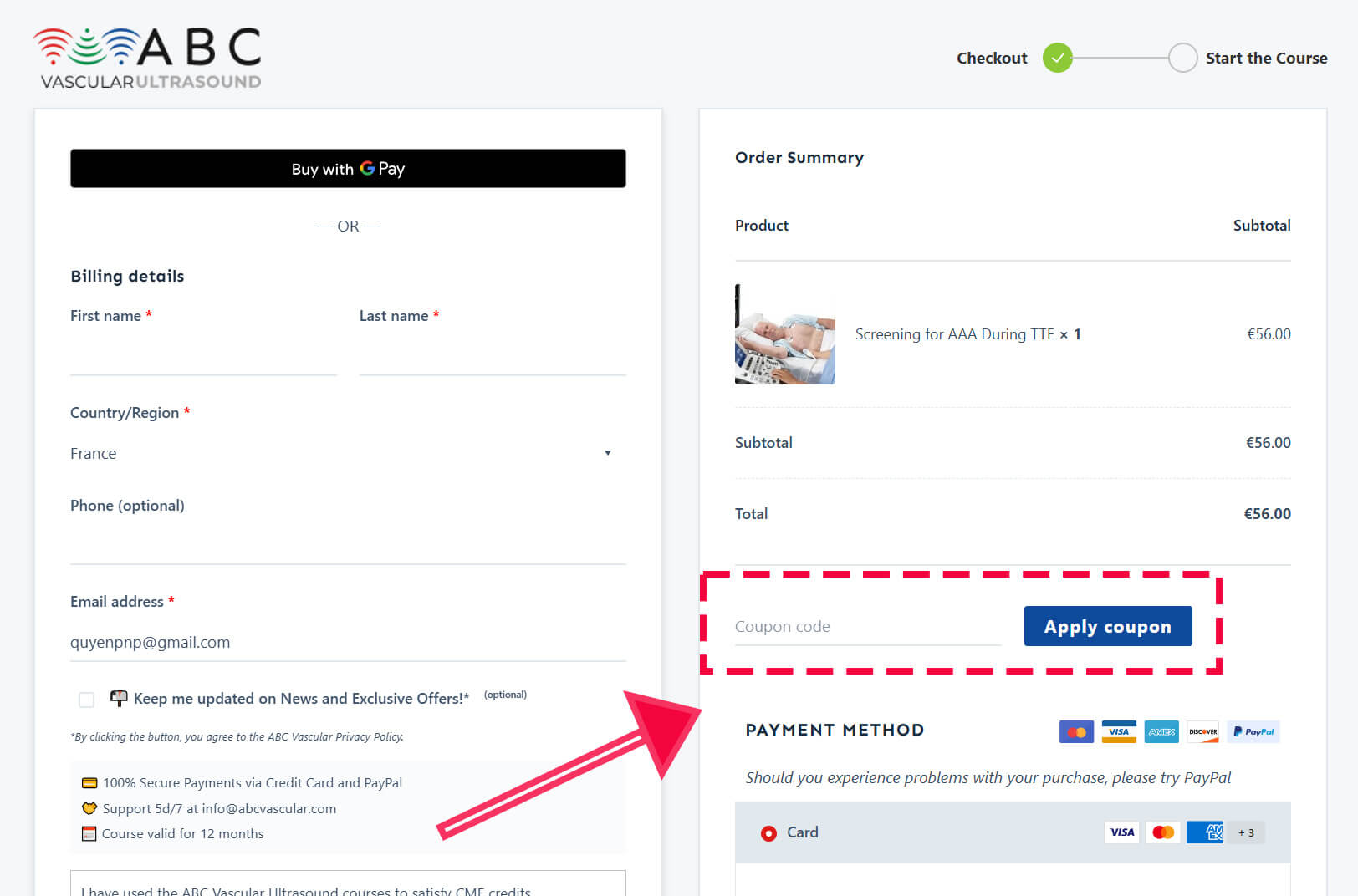
  • Apply coupon in cart
  • On the CHECKOUT page, enter the promotion code in the Coupon Code section exactly as specified. Select Apply Coupon.
  • Apply coupon in checkout page

    • Don’t add spaces before, inside of, or after the promotion code.
    • Proceed to check out
    • Verify that the promotion code was applied successfully by viewing the price on the final checkout page before placing your order.
    • If, for some reason, you don’t place an order at that time, the promotion remains on your account until it’s used or expires.

Yes, a free-trial account gives you access to selected free chapters in each master course. A paid subscription gives you unlimited access to the course content you have purchased.

In addition to the courses, access to the case library is free. We are continually building up informative cases included in this section.

Start Your Free Trial

No, once you have paid and enrolled in a course, no further payment will be deducted from your credit card.


You’ll be able to pay by using your credit and debit card or Paypal. Should you encounter any difficulties in making payment, don’t hesitate to contact us at info@abcvascular.com

Should you experience problems with your purchase, we encourage you to try PayPal instead.


We are not accepting Amex at this stage.

Yes, absolutely! Even if the price of the course is not displayed in your own currency, the amount will be automatically converted to your currency at the current exchange rate according your bank.

FAQ Access Your Course

Accessing your course on ABC Vascular is straightforward, whether you’re using a desktop or a mobile device. Follow these steps to start learning today:

  1. Log In: Begin by logging into your account on the ABC Vascular website. Look for the “Login” option, usually found at the top right corner of the homepage.
  2. Navigate to ‘My Courses’: After logging in, locate the ‘My Courses’ tab on the right-hand side of your screen for Desktop, at the bottom for the mobile and click on it.
  3. Select Your Course: You’ll see a list of courses you’re enrolled in. Find the course you wish to start and click on it to proceed to the course page.
  4. Start the Course: On the course page, you’ll find a red ‘Start the Course’ button. Clicking this button will take you to the bottom of the page.
  5. Choose a Lesson: At the bottom, all the topics covered in the course are listed. Select the lesson you want to begin with to start learning.

🇮🇹 Accedere al tuo corso su ABC Vascular è semplice, sia che tu stia utilizzando un desktop o un dispositivo mobile. Segui questi passaggi per iniziare a imparare oggi:

  1. Accedi: Inizia accedendo al tuo account sul sito web di ABC Vascular. Cerca l’opzione “Login”, solitamente trovata nell’angolo in alto a destra della homepage.
  2. Naviga su ‘I Miei Corsi’: Dopo aver effettuato l’accesso, localizza la scheda ‘I Miei Corsi’ sul lato destro dello schermo per il Desktop, in basso per il mobile e clicca su di essa.
  3. Seleziona il Tuo Corso: Vedrai un elenco dei corsi in cui sei iscritto. Trova il corso che desideri iniziare e clicca su di esso per procedere alla pagina del corso.
  4. Inizia il Corso: Nella pagina del corso, troverai un pulsante rosso ‘Inizia il Corso’. Cliccando su questo pulsante sarai portato in fondo alla pagina.
  5. Scegli una Lezione: In fondo, tutti gli argomenti coperti nel corso sono elencati. Seleziona la lezione con cui desideri iniziare per iniziare a imparare.

From Mobile

From Desktop

FAQ Access Your Certificate

You can follow these steps to access your ABC Vascular Certificate:
1. Log In: Begin by logging into your account on the ABC Vascular website. Look for the “Login” option, usually found at the top right corner of the homepage.
2. Navigate to “My Certificate”: After logging in, locate the “My Certificate” tab: – On Desktop: on the left-hand side of your screen. – On Mobile: at the bottom of your screen. Click on “My Certificate” to open your certificate area.
3. Complete the short survey (required): Before you can download your certificate, you’ll need to complete a short survey. This step is required for accreditation purposes, but your answers remain fully anonymous. The survey takes only 3-5 minutes and helps us improve our courses and maintain the quality and accreditation of ABC Vascular.
4. Open your certificate: Once you submit the survey, you will see a blue “Open Certificate” button. On the PDF viewer, you can:
– Click the downward arrow icon to download your certificate to your device, or
– Click on the blue “Open Certificate” button to view the PDF in a separate browser tab.
5. Copy the course synopsis (optional): Under the certificate, you will also find the course synopsis/summary. You can copy this text if you need to paste it into your CV, your training logbook or your hospital documentation.
🇮🇹 Come accedere al tuo Certificato ABC Vascular
1. Accedi: Inizia effettuando l’accesso al tuo account sul sito di ABC Vascular. Cerca l’opzione “Login”, solitamente situata nell’angolo in alto a destra della homepage.
2. Vai su “My Certificate”: Dopo aver effettuato l’accesso, individua la scheda “My Certificate”:
– Su Desktop: sul lato sinistro dello schermo.
– Su Mobile: nella parte inferiore dello schermo.
Clicca su “My Certificate” per aprire l’area dedicata ai tuoi certificati.
3. Compila il breve questionario (obbligatorio): Prima di poter scaricare il tuo certificato, dovrai completare un breve questionario. Questo passaggio è richiesto ai fini dell’accreditamento, ma le tue risposte rimangono completamente anonime
.Il questionario richiede solo 3-5 minuti e ci aiuta a migliorare i nostri corsi e mantenere la qualità e l’accreditamento di ABC Vascular.
4. Apri il tuo certificato: Una volta inviato il questionario, vedrai un pulsante blu “Apri Certificato”. Nel visualizzatore PDF puoi:
– Cliccare sull’icona della freccia verso il basso per scaricare il certificato sul tuo dispositivo, oppure
– Cliccare sul pulsante blu “Apri Certificato” per visualizzare il PDF in una nuova scheda del browser.
5. Copia la sinossi del corso (facoltativo): Sotto il certificato troverai anche la sinossi/riassunto del corso. Puoi copiare questo testo se ti serve per il tuo CV, il tuo registro formativo o la documentazione ospedaliera.

From Mobile

From Desktop

New Release

Your Ultimate Guide to Carotid plaque Ultrasound Assessment

By: C. Vitale & F. D'Abate

Explore the world of carotid atherosclerotic plaques with ABC Vascular’s latest eBook, “A Practical Guide on the Ultrasound Assessment of Carotid Atherosclerotic Plaques”. This guide offers healthcare professionals a comprehensive understanding of carotid plaque ultrasound assessment and its role in cardiovascular risk management.

Trusted by
